
If Open Banking has not imported your most recent transactions as expected, and attempting to refresh transactions returns an error, the recommended resolution is to unlink and relink the Open Banking connection.
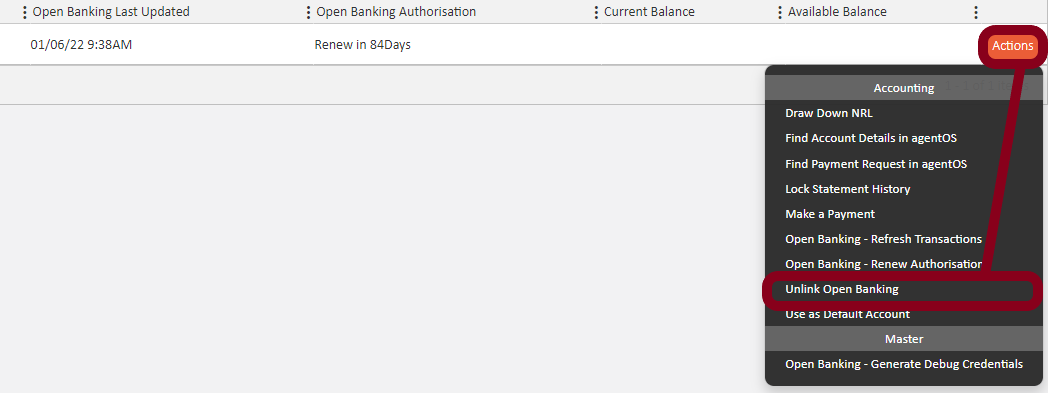
Step 1 — Unlink the Open Banking connection:
- Go to Accounts > Bank Accounts
- Locate the affected bank account
- Click the Actions button next to that account
- Select Unlink Open Banking
Step 2 — Relink the Open Banking connection:
Once unlinked, follow the standard process to link your account to Open Banking again:
- Go to Accounts > Bank Accounts
- Click Actions against the relevant bank account
- Select Link to Open Banking
- Click Connect and follow the TrueLayer authentication steps (allow permission, select country and bank, complete your bank's security steps)
- Once redirected back to agentOS, click Link to Open Banking to complete the process
- When prompted, select the correct account and choose midnight of the day from which you wish to import statements — this ensures only entries from the correct date are imported
Once relinked, your transactions will begin importing again and can be viewed under Reconcile Statements in the left-hand menu.
Note on Standing Orders: Standing Orders will not automatically link to a person's profile, as the reference on the bank statement does not match the reference received from the bank via Open Banking.
Note on possible duplicate transactions:
If a transaction is missing but the rest of the account has refreshed normally, this may be because two payments shared the same amount, date, and reference. Open Banking treats the second entry as a likely duplicate and does not import it, to avoid double-counting.
If you believe a genuine transaction has been left out this way, contact support@agentos.com with the date, amount, and reference so we can check and add it manually.
If the issue persists after relinking, please contact support@agentos.com for further assistance.