
Note: This article is intended for internal staff use only and is not intended for clients.
Step 1 — Check the Contract Terms
When a client gives notice, first confirm that the notice falls within their contract terms.
- Clients who joined from 2018 onwards are on a 24-month rolling contract from the start.
- Clients who joined before 2018 will have been on an initial 12-month contract, with a 24-month rolling contract thereafter.
Example: If a client started on 10/12/2010, their initial 12-month term takes them to 10/12/2011. From that point, calculate in 24-month rolls to find their current renewal date.
Advise the client that they are in contract until the calculated renewal date. Notice of three months is accepted from three months prior to the renewal date up to the renewal date itself — but not after it. If notice is given after the renewal date, the client begins a new 24-month roll and the next renewal date applies.
If notice is given well in advance of the renewal date, proceed with the steps below.
Step 2 — Update the Billing Sheet
Add the following details to the additional invoicing sheet via the support inbox Google Sheet so that billing can be processed accordingly:
- End date
- Client name
- Reason for leaving
- Ticket number
- Any other relevant information
Step 3 — Set the Company Expiry Date in agentOS
In agentOS, go to Office > Set Company Expiry and enter the date on which access is to be suspended.
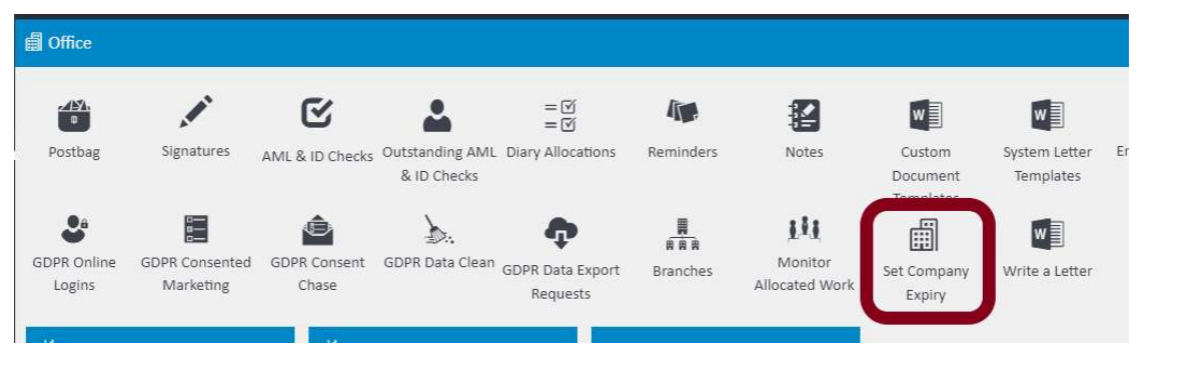
Step 4 — Update the Package Name in Company Settings
Go to Settings > Company Settings > Edit. In the agentOS Details section on the right-hand side, update the Package Name field to reflect the reason the client is leaving.
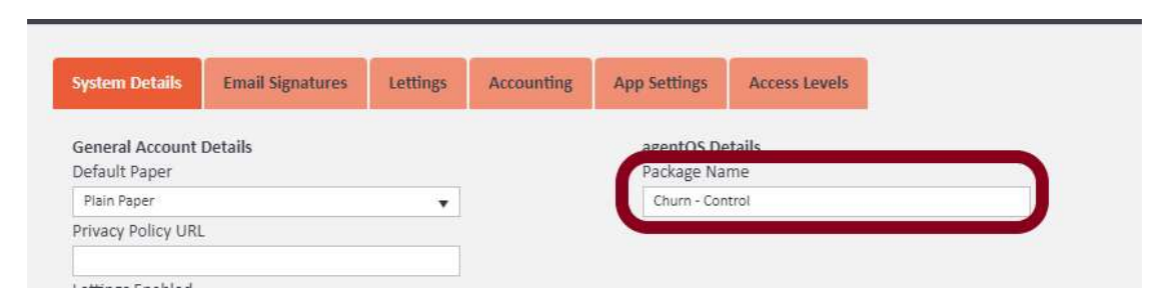
The package names and when to use each one are as follows — these must be copied and pasted exactly as shown below in order to report correctly to CSB:
Churn - Control — out of our control. Use when the client has been brought out by another party, has not given a reason, or is at the end of a DH package.
Churn - Adoption — lack of adoption. Use when the client is leaving two years or more after their start date and has not fully utilised agentOS or taken to the system.
Churn - Success — lack of success. Use when the client has not been able to get out of the system what they wanted and it has not worked for them.
Updating the package name correctly ensures the information is reported to CSB accurately for management meetings.
For any questions about this process, contact support@agentos.com.