
The main Dashboard in agentOS includes dedicated fields under the Prospecting and Sales & Lets sections to show you which people still require an AML or ID check. There are four fields:
- Prospecting – AML Checks: Vendors not checked
- Prospecting – AML Checks: Landlords not checked
- Sales & Lets – AML Checks: Buyers not checked
- Sales & Lets – ID Checks: Tenants not checked
What triggers a record to appear?
For Vendors, Landlords, and Buyers, a record will appear in the relevant field when all of the following apply:
- The person is linked to a Sales Instruction or Tenancy created within the last 60 days
- That instruction or tenancy is at the Advertised stage
- The person still has AML checks outstanding
For Tenants, a record will appear when:
- The person is linked to a Tenancy created within the last 60 days
- That tenancy is at the Let Agreed stage
- The tenant still has ID or Right to Rent checks outstanding
Viewing the full report
Clicking any of these dashboard fields takes you through to a detailed report showing exactly who still requires a check. You can also access this report directly by going to Office > Outstanding AML & ID Checks.
Reviewing all AML and ID checks
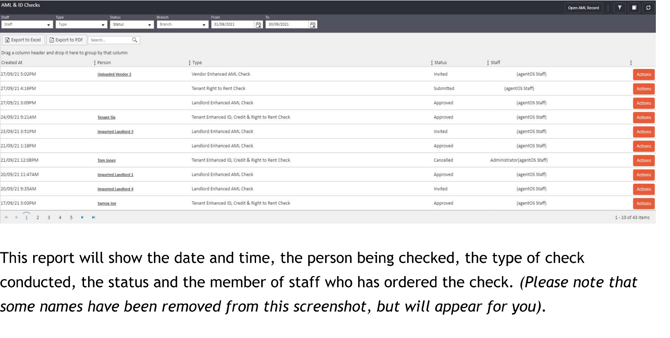
For a broader overview of all AML and ID checks that have been ordered — including their date, the person being checked, the type of check, the current status, and the member of staff who ordered it — go to Office > AML & ID Checks. From here you can also export the report to Excel or PDF.
If you need assistance with AML or ID checks, contact us at support@agentos.com.