
MyProp app empowers vendors with property marketing insights and convenient access to all information about their sale, providing transparency throughout the sales process.
Accessing MyProp as a Vendor
Vendors access MyProp through:
- Your agency's branded portal: myprop.app/[yourshortname], or
- The universal portal: myprop.app (then select your agency)
Vendors can create an account by visiting either URL and clicking "Create Account", using the email address you have on file for them in agentOS. Once signed in, they see their property dashboard with the following sections:
- Insights
- Contacts
- Documents
- Viewings
- Offers
- Suggestions
If a vendor has multiple properties with your agency, they can switch between properties using the navigation sidebar.
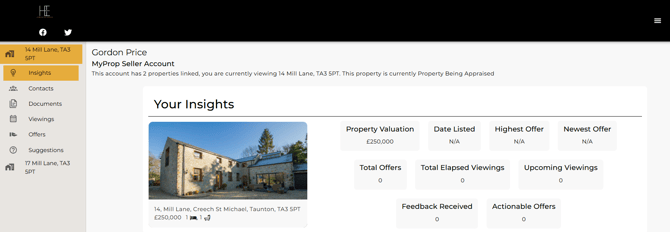
Your Insights
The Insights section provides real-time marketing performance metrics:
Property Overview:
- Property image and full address
- Current marketing status
Viewing the Online Brochure: Clicking on the property image takes vendors directly to the online brochure for their property. This allows vendors to:
- Preview how their property appears to potential buyers
- Share the brochure link with friends, family, or their own contacts
- View the full marketing presentation including all photos and property details
Key Metrics:
Property Valuation Current asking price
Date Listed When the property was marketed (if applicable)
Highest Offer Highest offer amount received to date
Newest Offer Most recent offer received with amount and date
Total Offers Number of offers received
Total Elapsed Viewings Number of completed property viewings
Upcoming Viewings Number of viewings scheduled
Feedback Received Count of feedback submissions from viewers
Actionable Offers Number of offers requiring vendor response or decision
These metrics help vendors understand marketing effectiveness and make informed decisions about their property sale.
Contacts
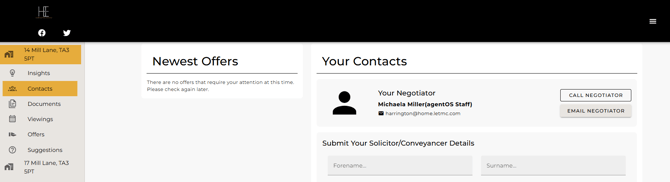
The Contacts section provides direct access to the vendor's negotiator:
Your Negotiator
- Negotiator name
- Email address
- Two action buttons:
- CALL NEGOTIATOR - Initiate phone call
- EMAIL NEGOTIATOR - Send email directly
Submit Solicitor/Conveyancer Details
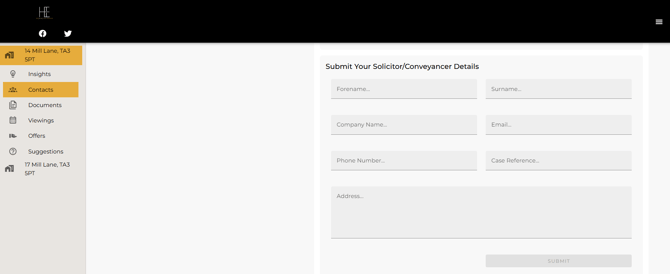
Vendors can submit their solicitor or conveyancer information through a form including:
- Forename and surname
- Company name
- Email address
- Phone number
- Case reference
- Property address
This allows your agency to have all transaction party details for sales progression.
Documents
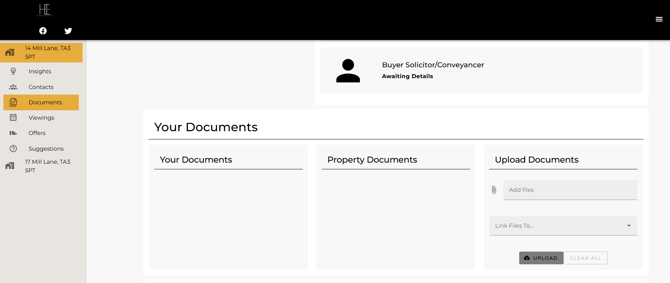
The Documents section has three tabs:
Your Documents Documents specific to the vendor
Property Documents Documents related to the property being sold (sales instructions, marketing materials, certificates, or any other documents your agency has made available)
Upload Documents
Vendors can upload their own documents:
- Click "Add files" to select documents
- Choose what to link files to using the dropdown
- Click UPLOAD to submit
- Documents are then accessible to your agency
This centralised document management means vendors can share important paperwork with your team without emailing attachments.
Viewings
The Viewings section is divided into subsections:
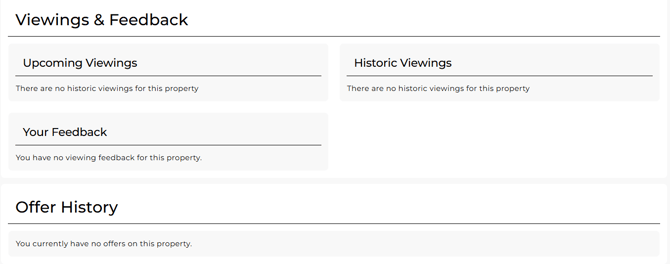
Viewings & Feedback
Shows viewing information organised into:
Upcoming Viewings Scheduled viewings for the property
Historic Viewings Record of completed viewings
Your Feedback Feedback from viewers about the property
This provides vendors with visibility of viewing activity and buyer responses to their property.
Offers
The Offers section displays offer information:
Offer History Shows all offers received on the property with relevant details and status
This transparency helps vendors track interest in their property and manage offer decisions.
Benefits for Your Agency
Providing vendors with MyProp access delivers significant benefits:
Reduced Administrative Workload
- Vendors check marketing performance themselves
- Viewing schedules visible 24/7
- Documents shared through the portal
- Contact details submitted by vendors directly
Enhanced Vendor Satisfaction
- Real-time marketing metrics available anytime
- Transparency builds trust
- Direct access to their negotiator
- Professional, modern service
Improved Communication
- Vendors can upload documents anytime
- Solicitor details captured systematically
- Viewing and offer information always accessible
- Reduced "what's happening?" queries
Streamlined Sales Progression
- Solicitor details captured early
- Document sharing simplified
- Vendor engagement visible
- Clear record of all offers
Setting Up Vendors in MyProp
To enable vendors to access MyProp:
- Ensure vendor records in agentOS have valid email addresses
- Inform vendors they can create an account at myprop.app/[yourshortname] or myprop.app
- Vendors click "Create Account" and use the email address you have on file for them
- Once logged in, they can immediately view their property information
Need Help?
For assistance with vendor portal access or questions about available features, contact support@agentos.com.