
All diary appointments linked to a property — including viewings, inspections, and valuations — can be viewed directly from the property record.
Step 1: Open the Property Record
Search for the property using the quick search bar and open the property page.
Step 2: Click Appointments
In the left-hand navigation ladder, click Appointments. The Diary section will open, showing all appointments booked against that property.
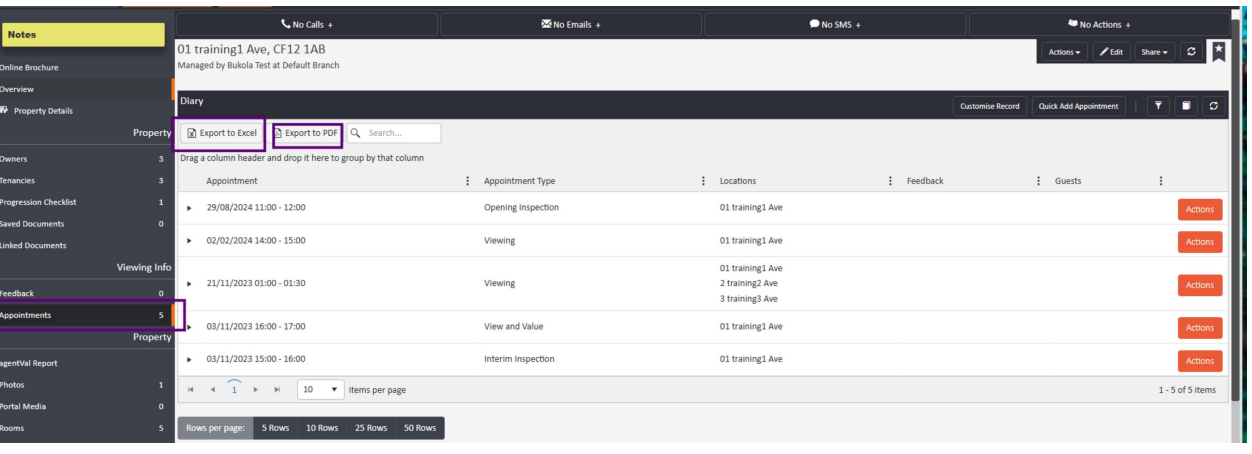
Exporting the Appointment List
From within the Appointments section, you can export the list for easier sorting or sharing using the buttons at the top of the grid:
- Export to PDF
- Export to Excel
Need Help?
If you have any questions about viewing property appointments in agentOS, contact the support team at support@agentos.com.
Article 2 of 2
Metadata
Category: agentOS
Subcategory: Power Reporting
Tags:
- Appointments
- Power Reporting
- Custom Report
- Export Appointments
- All Properties
- Consolidated Report
Meta description: Find out how to generate a consolidated report of appointments across all properties and users in agentOS using the Power Reporting custom report builder.
Split recommendation: Split from the individual property appointments article — this covers a different workflow using Power Reporting rather than the property record.
Question (Title)
How do I export appointments across all properties in agentOS?
Subtitle (Quick Answer)
To pull a full list of appointments across all properties and users in agentOS, use the Power Reporting tool to create a custom report. This generates a consolidated view that is not available from individual property records.
Detailed Answer
Viewing appointments on an individual property is done via the property record. However, if you need a consolidated list of appointments across all properties — for example, for a branch-wide review or management report — this requires a custom report built using Power Reporting.
To get started, refer to the Power Reporting — Introduction guide for step-by-step instructions on building a custom report.
Need Help?
If you have any questions about Power Reporting or exporting appointment data in agentOS, contact the support team at support@agentos.com.