
The rent breakdown feature allows you to specify how the total rent is split between individual tenants on a tenancy. This is useful when multiple tenants share a property and each has a different rental responsibility, or when one tenant vacates and rent needs to be reassigned to the remaining tenant.
Step 1: Open the tenancy
Navigate to the relevant property and open the tenancy. You can find the property by searching for it using the search bar at the top of the screen, or by going to Lettings > Properties and entering the street name.
Step 2: Go to the Rent Schedule
On the left-hand navigation ladder of the tenancy, click Rent Schedule.
Step 3: Open the Actions menu
Click the Actions button to the right-hand side of the rent schedule entry. A dropdown menu will appear with the following options: Account, Setup Rent Breakdown, Office, and Archive.
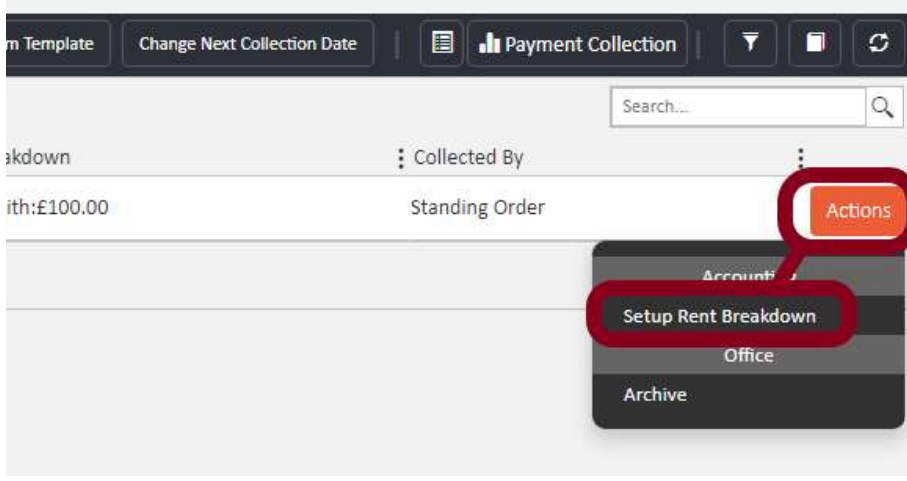
Step 4: Set the rent breakdown
Click Setup Rent Breakdown. You can now edit the rental amount assigned to each tenant on the tenancy. Enter the amount each tenant is responsible for, ensuring that any tenant with no rental responsibility has 0.00 entered against their name.
Once you have entered the correct amounts, click Update, then confirm by clicking Setup Rent Breakdown to save the changes.
Note: The amounts entered in the rent breakdown should add up to the total rent on the schedule. If a tenant vacates and rent is being reassigned to the remaining tenant, set the departing tenant's amount to 0.00 and update the remaining tenant's amount accordingly.
If you need any assistance, contact the agentOS support team at support@agentos.com.