
Renewing a tenancy in agentOS creates a new Let Agreed tenancy record based on the existing one. This is the correct process to follow when a tenancy has an end date and both parties are agreeing to continue.
💡 Renewal vs extension: Renewing is used where a tenancy has an existing end date. If the tenancy has no end date and you want to carry out a formal extension process, refer to the How do I extend a tenancy in agentOS? guide instead.
Step 1: Open the tenancy
Use the quick search bar at the top of the screen to find the property by address, then select the relevant tenancy from the results. Alternatively, navigate to the property record, click Tenancies in the left-hand navigation ladder, and open the tenancy from there.
Step 2: Confirm the tenancy has an end date
Before renewing, check that the tenancy has an end date recorded. You can verify this by looking at the Tenancy Details section in the left-hand navigation ladder.
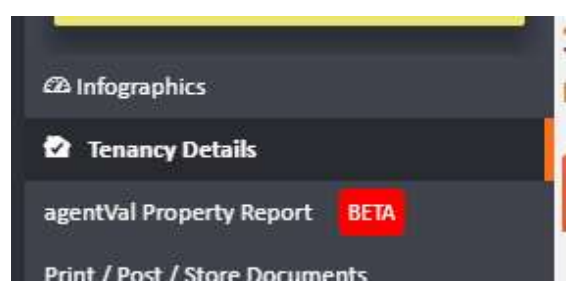
If no end date is present, you will need to add one before the Renew Tenancy option becomes available.
Step 3: Select Renew Tenancy from the Actions menu
Click the Actions button in the top right corner of the tenancy page. A dropdown menu will appear with two sections — Lettings and Office. Under the Lettings section, select Renew Tenancy.
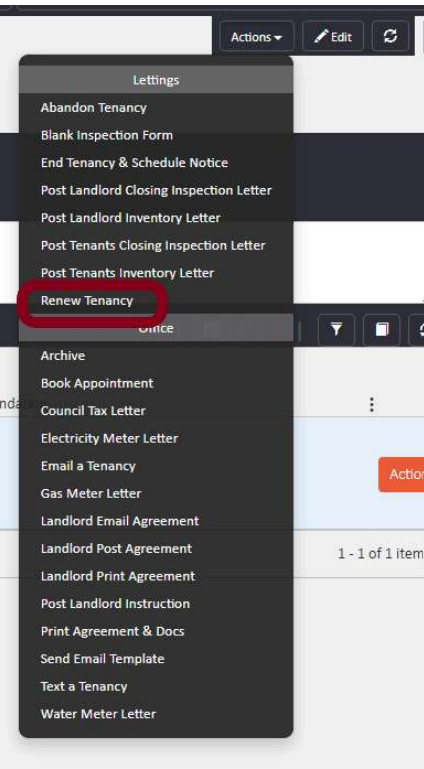
Step 4: Review and sign the new tenancy
Selecting Renew Tenancy creates a new Let Agreed tenancy record. Review the details to ensure everything is correct, then sign the tenancy when both parties are ready.
If you need further assistance, contact the agentOS support team at support@agentos.com.