
When a landlord record is fully anonymised in agentOS, their name and personal details are wiped from the system. This means they can no longer be found by searching their name. However, there are situations where an anonymised landlord's account may still have uninvoiced or unpaid items that are affecting your drawdown. The steps below explain how to locate the record and resolve those financials.
Step 1: Open the Landlords CRM report
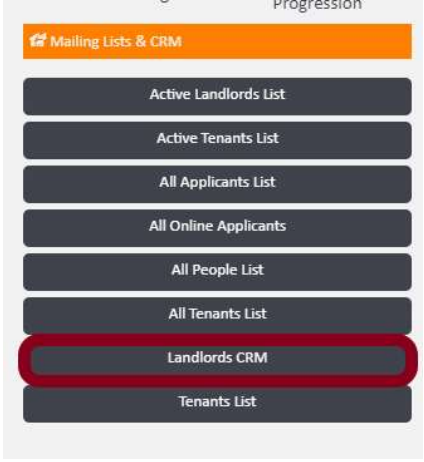
From the main navigation bar, go to Lettings, then select Mailing Lists & CRM. From the list of available reports, click Landlords CRM.
Step 2: Generate the report and filter by "anonymised"
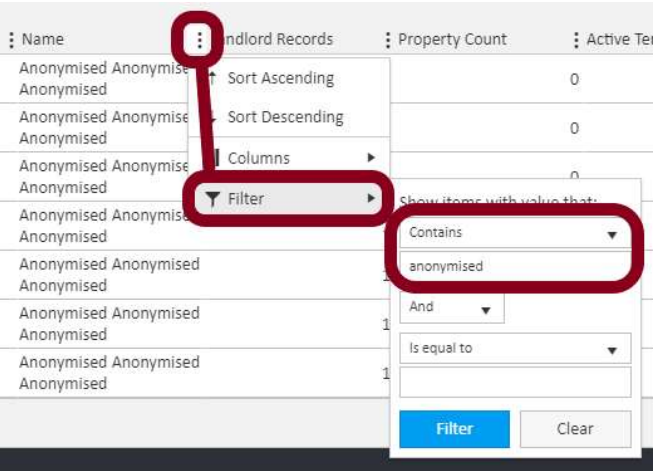
Once the report has loaded and the data is visible, click the column options icon on the Name column header and select Filter. Set the filter condition to Contains and enter anonymised in the value field, then click Filter to apply.
Step 3: Access the landlord account via the ID number
The filtered results will display all anonymised landlord records. Each row includes a Global Reference (landlord ID number) displayed as a clickable link — for example, lan-652 or lan-653.
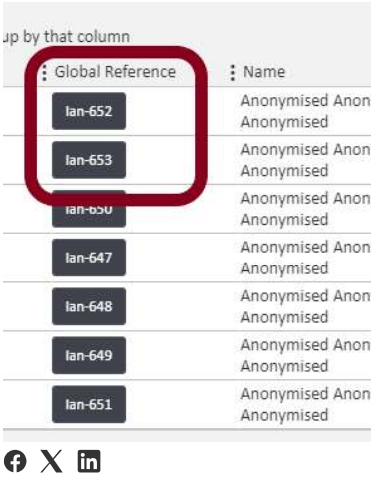
Click the relevant landlord ID link to open their account. From there you can invoice charges, process outstanding items, and carry out any other financial actions needed to resolve the issue affecting your drawdown.
If you need further assistance, contact support@agentos.com.