
The Email the Block Tenancies feature allows you to contact all tenants across every property linked to a block in a single action. This is particularly useful for block-wide communications such as maintenance notices, building updates, or important announcements.
⚠️ Please note: Tenant email addresses are added to the BCC field automatically. A maximum of 50 recipients can be included per email sent using this feature.
Step 1: Open the property block record
Use the quick search bar at the top of your screen to find and open the relevant property block.
Step 2: Select Email the Block Tenancies from Actions
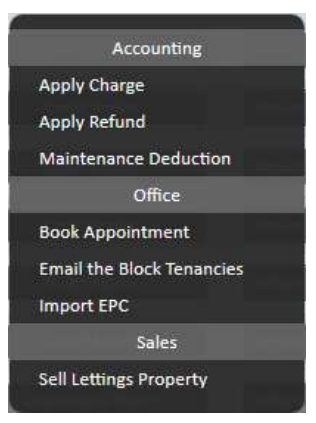
Click the Actions button in the top right corner of the property block page. From the dropdown menu, scroll to the Office section and select Email the Block Tenancies.
Step 3: Complete the email form
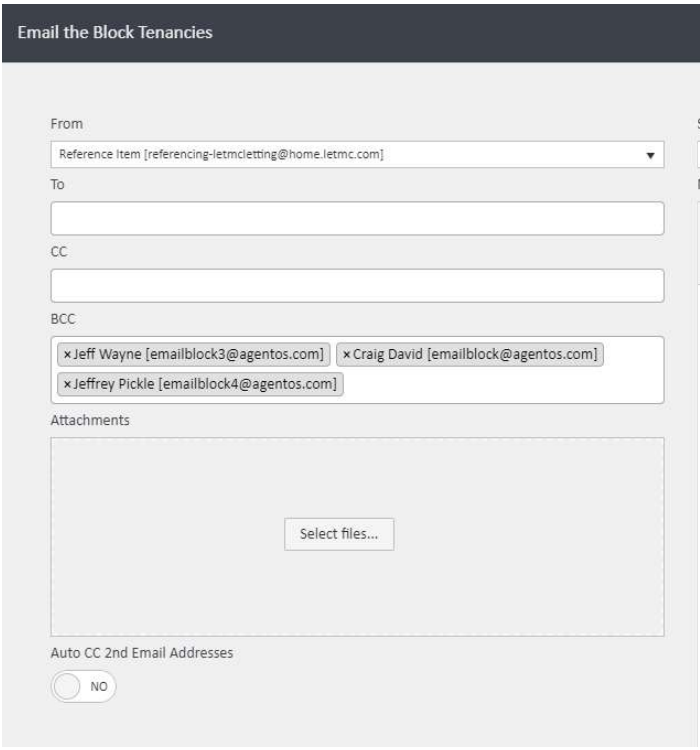
A pop-up window labelled Email the Block Tenancies will appear. Complete the form as follows:
- From — select the sending email address from the dropdown
- To — add any specific individual recipients here if needed (optional)
- CC — copy in additional recipients such as a colleague or manager (optional)
- BCC — agentOS automatically populates this field with the email addresses of all tenants linked to the block. You can see each address listed as a tag and remove individual recipients if required
- Attachments — click Select files… to attach any documents you wish to include
- Auto CC 2nd Email Addresses — toggle this to Yes if you want agentOS to automatically copy in any secondary email addresses held on tenant profiles
Step 4: Add a subject and message, then send
Complete the Subject and Message fields on the right-hand side of the form. Once you are happy with the content, click Email the Block Tenancies in the bottom right corner of the window to send.
If you need further assistance, contact support@agentos.com.