
New or advertised instructions
⚠️ Important: Do not attempt to delete an advertised instruction directly. You must cancel the advertising first so it reverts to a new instruction before proceeding.
If the instruction is currently advertised, open the tenancy, click the Actions button, and select Cancel Advertising. Once it reverts to a new instruction, you can abandon it using either of the two methods below.
Option A — From the Tenancies list
Navigate to the property using the quick search bar, then click Tenancies in the left-hand navigation ladder. Locate the instruction in the list, click the Actions button on the right-hand side of that row, and select Abandon Tenancy.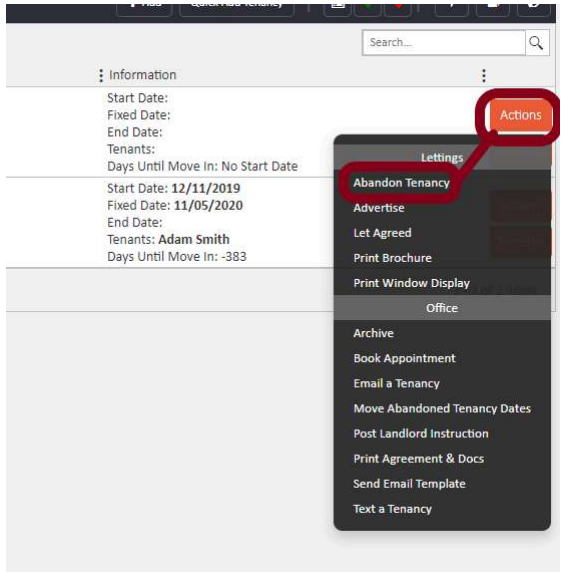
Option B — From within the tenancy page
Alternatively, open the tenancy instruction directly and click the Actions button in the top right corner of the page, then select Abandon Tenancy.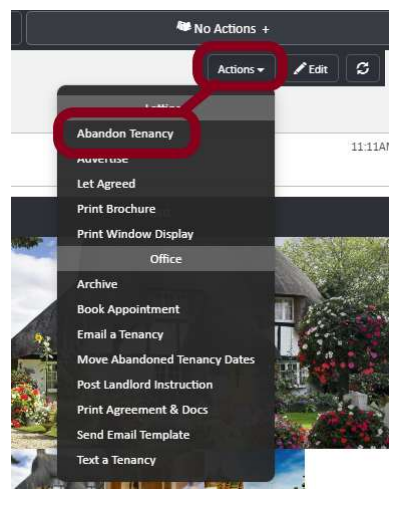
Signed tenancies
Deleting a signed tenancy is not recommended, as signed records should be retained for auditing purposes. If a signed tenancy is not going ahead, the correct approach is to indicate this within the record rather than removing it.
To do this, open the tenancy and set the end date and fixed date to match the start date, so that all three dates are identical. This makes it clear within the system that the tenancy did not proceed.
For guidance on adding or changing an end date on a signed tenancy, refer to the Removing and Changing an End Date guide.
⚠️ Date clash? If the dates on an abandoned signed tenancy are preventing you from creating a new tenancy in its place, contact support@agentos.com. The support team can adjust the dates to accommodate your new instruction.
If you need further assistance with any of the above, contact support@agentos.com.