
Question (Title):
How do I archive and un-archive records in agentOS?
Subtitle (Quick Answer):
Most records in agentOS can be archived using the Archive option in the Actions menu. Archived records are hidden from reports and search results but can be restored at any time by un-archiving them.
Automated Actions Still Run on Archived Records
Archiving a record stops manual actions, but it does not stop automated ones. Auto charges, auto-transfers, and auto-reconciliations linked to an archived record will continue to run as normal. This can lead to duplicated charges (for example, a tenancy and its linked landlord both being charged), unexpected charges appearing on a profile, or accounts showing in credit with no obvious cause. If you spot any of these, check for an archived record in the chain before assuming it's an error. To stop automated actions, cancel or amend them individually before archiving, archiving alone will not pause them.
Detailed Answer:
Archiving a Record
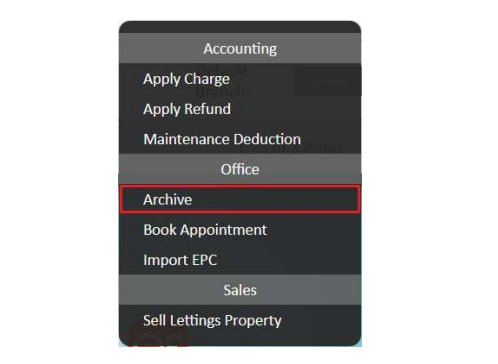
To archive a record in agentOS, open the relevant record and click Actions, then select Archive.
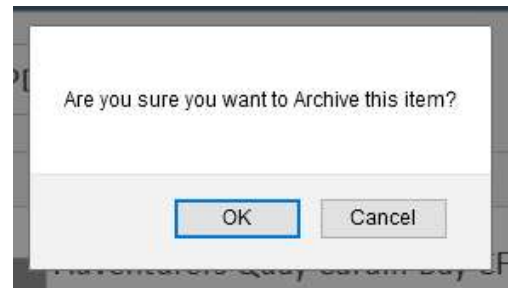
A confirmation prompt will appear asking whether you are sure you want to archive the item. Click OK to confirm.
Once archived, the record will be removed from view in reports and quick search results.
Finding Archived Records
Archived records are hidden by default but can be displayed by using the Include Archived filter. When this filter is active, it will appear highlighted in orange.

Important: Archiving Is Not Cascading
Archiving a record will not automatically archive any records linked to it. For example, if you archive a property, any tenancies linked to that property will remain active and visible. If you need to archive everything connected to a record, each linked object must be archived individually.


Actions on Archived Records
Once a record has been archived, available actions are restricted. The only action available on an archived record is to un-archive it. To carry out any other actions, the record must be un-archived first.
Audit Trail
Every time a record is archived or un-archived, an entry is added to the Security Audit report, recording the name of the staff member who performed the action and the details of the affected record.
For any questions, contact support@agentos.com.