
Accessing Object Types
To add options to dropdown menus, click the person icon in the top right-hand corner of agentOS and select Object Types from the dropdown menu.
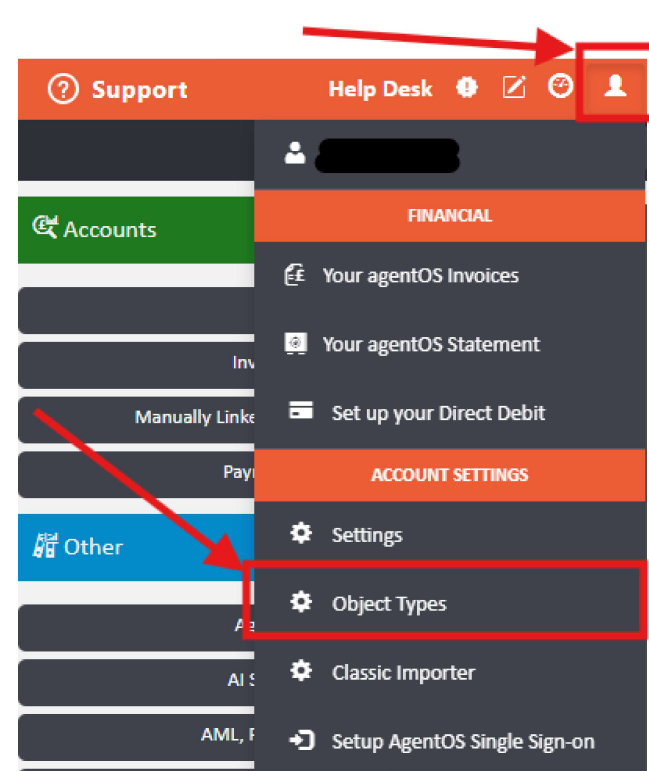
Object Types contains an extensive list of sections covering different areas of the system, each of which can be expanded to add new options. Sections are divided by area, for example: Tenancy service types, Landlord and property sources, and certificate types.
Adding a New Option
Click on the section you would like to add options to. In this example, we will look at adding a new certificate type.
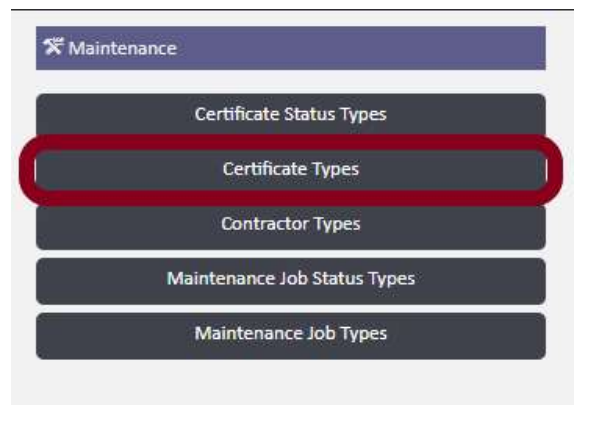
Once you have clicked into the relevant section, click the + Add button in the top right-hand corner of the screen.

After clicking Add, a form will appear for you to complete. The fields shown will vary depending on the section you are adding to.
For a certificate type, the form includes the following fields:
- Name — the name of the certificate type
- Chase Landlord When Due — toggle to Yes if the landlord should be chased when this certificate is due
- Chase Tenant When Due — toggle to Yes if the tenant should be chased when this certificate is due
- Chase Agent When Due — toggle to Yes if the agent should be chased when this certificate is due
- Chase Days Before Due — sets how many days before the due date the system should send a reminder (defaults to 10)
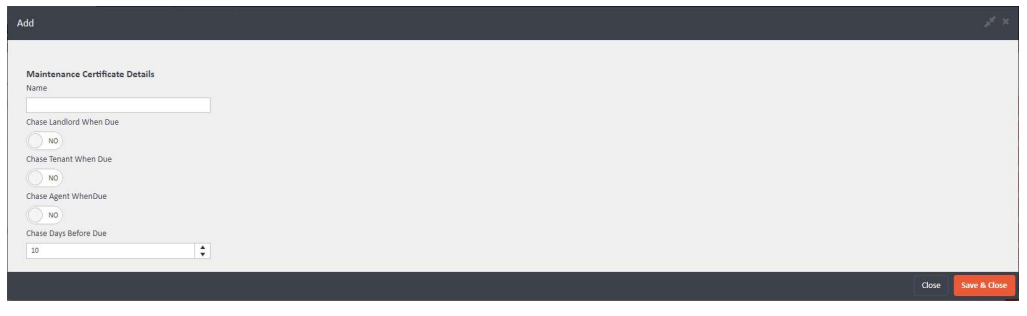
Give the option a name, use the toggles to select who should be chased when the certificate is due, and set the number of chase days before the due date. Once complete, click Save & Close.
Important Note
Each different object type section will have a slightly different add screen with different fields relevant to that section. If you get stuck with any particular section, contact support@agentos.com and the support team will be happy to help.