
Meter readings can be recorded against a tenancy in AgentOS for gas, electricity, and water. You can add both opening readings at the start of a tenancy and closing readings at the end.
Step 1: Find the property
Use the quick search bar at the top of your screen to search for the property address and select it.
Step 2: Select the tenancy
On the property record, click Tenancies in the left-hand navigation ladder. Select the relevant tenancy from the list.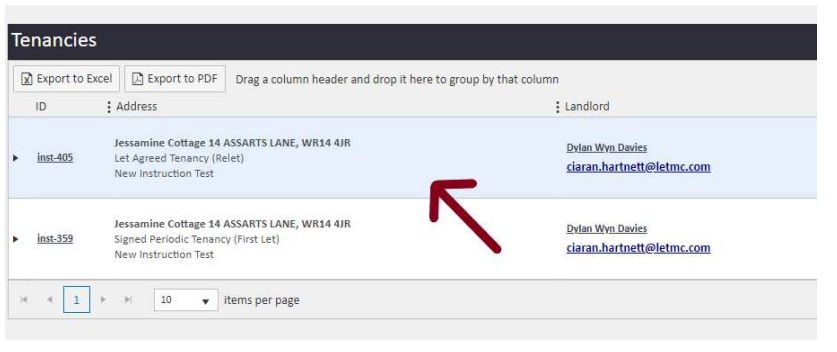
Step 3: Open the Edit screen
On the tenancy page, click the Edit button in the top right corner.
Step 4: Navigate to the Meter Readings tab
In the Edit screen, click the Meter Readings tab — this is the final tab along the top of the form.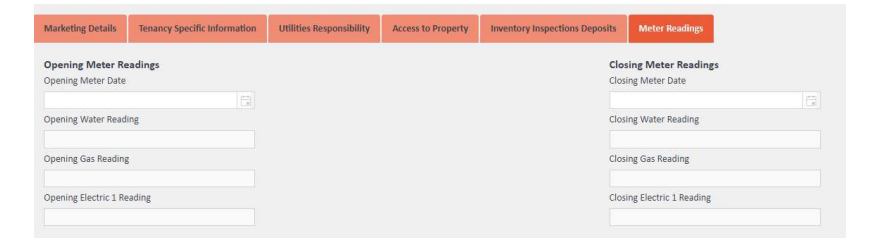
Step 5: Enter the readings
Complete the relevant fields for either opening or closing readings:
- Meter Date — the date the readings were taken
- Water Reading
- Gas Reading
- Electric 1 Reading
Fill in only the fields that apply. If you are recording opening readings at the start of the tenancy, complete the left-hand column. If you are recording closing readings at the end of the tenancy, complete the right-hand column.
Step 6: Save
Click Save to record the readings against the tenancy.