
agentOS allows you to create your own certificate types to suit your agency's needs. These are managed through the Object Types section in your account settings.
How to access Certificate Types
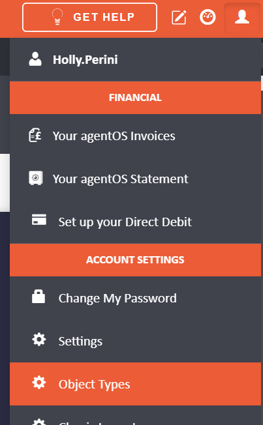
- Click the person icon in the top right corner of agentOS.
- From the menu that appears, select Object Types under the Account Settings section.
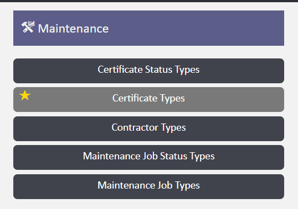
- In the Object Types screen, locate the Maintenance section and click on Certificate Types.
How to add a new certificate type
- Click the + Add button in the top right-hand corner of the screen.
- A form will appear with the following fields:
- Name — enter a name for the certificate type (for example, "Gas Safety Certificate" or "EICR")
- Chase Landlord When Due — toggle on if you want the system to automatically chase the landlord when this certificate type is due
- Chase Tenant When Due — toggle on if you want the system to chase the tenant
- Chase Agent When Due — toggle on if you want the system to chase the agent
- Chase Days Before Due — enter the number of days before the due date that you would like the reminder to be triggered (the default is 10 days)
- Once you have completed the form, click Save & Close to save the new certificate type.
The certificate type will now be available to select when logging or managing certificates within agentOS.
Need help? Contact the support team at support@agentos.com.