
Once a tenant has been added to agentOS, you can attach a guarantor to their record by following these steps:
- Use the Quick Search box to find the tenant you wish to update.
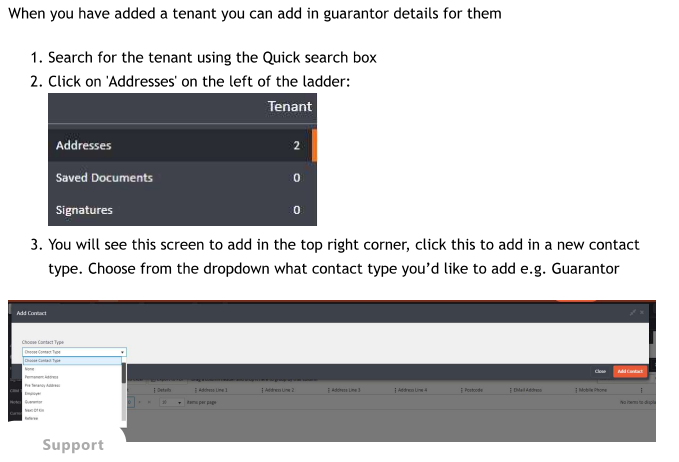
- On the tenant's record, click Addresses from the left-hand ladder menu.
- In the top right corner of the Addresses screen, click the Add button. A dropdown will appear — select Guarantor as the contact type.
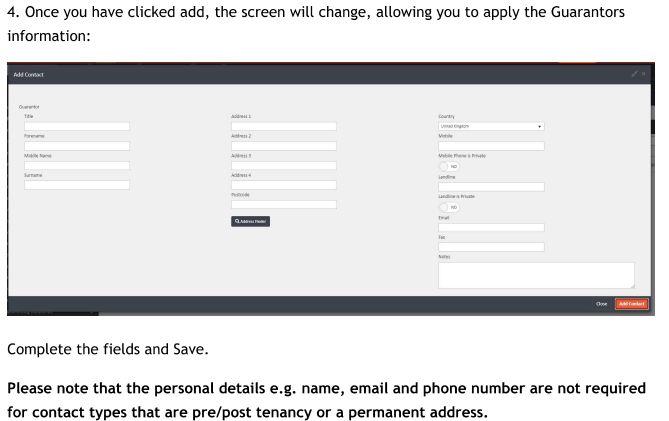
- The form will expand to display the guarantor's details fields. Complete the relevant information, including name, address, contact number, and email address.
- Click Add Contact to save the guarantor's details.
Important note: Personal details such as name, email address, and phone number are not required for contact types that relate to a pre-tenancy address, post-tenancy address, or permanent address. These fields are only mandatory for contact types like Guarantor, Next of Kin, and Employer.
If you need assistance, please contact support@agentos.com.